Last-Minute Black Friday Email Marketing Checklist
SanitizeEmail•22 Nov 2025•5 min Read
Black Friday and Cyber Monday are the biggest email marketing days of the year, but most businesses rush their campaigns. If your email list is not clean, validated, and ready, your messages risk landing in spam or bouncing before they reach your audience. The good news is that even if you are late to prepare, you can still optimize your list and improve deliverability before sending your holiday emails.
This guide gives you a fast, practical checklist to get your email list ready for Black Friday and Cyber Monday. You will learn what to fix, what to clean, and how to validate your list quickly using tools like SanitizeEmail. By following these steps, you can maximize your Black Friday email marketing results even at the last minute. If you’re also evaluating tools to support your Black Friday campaigns, we’ve curated a regularly updated Black Friday and Cyber Monday SaaS deals roundup featuring marketing, sales, and productivity tools.
Below is a complete checklist you can act on today. These steps focus on what gives you the fastest improvements in deliverability and engagement right before Black Friday.
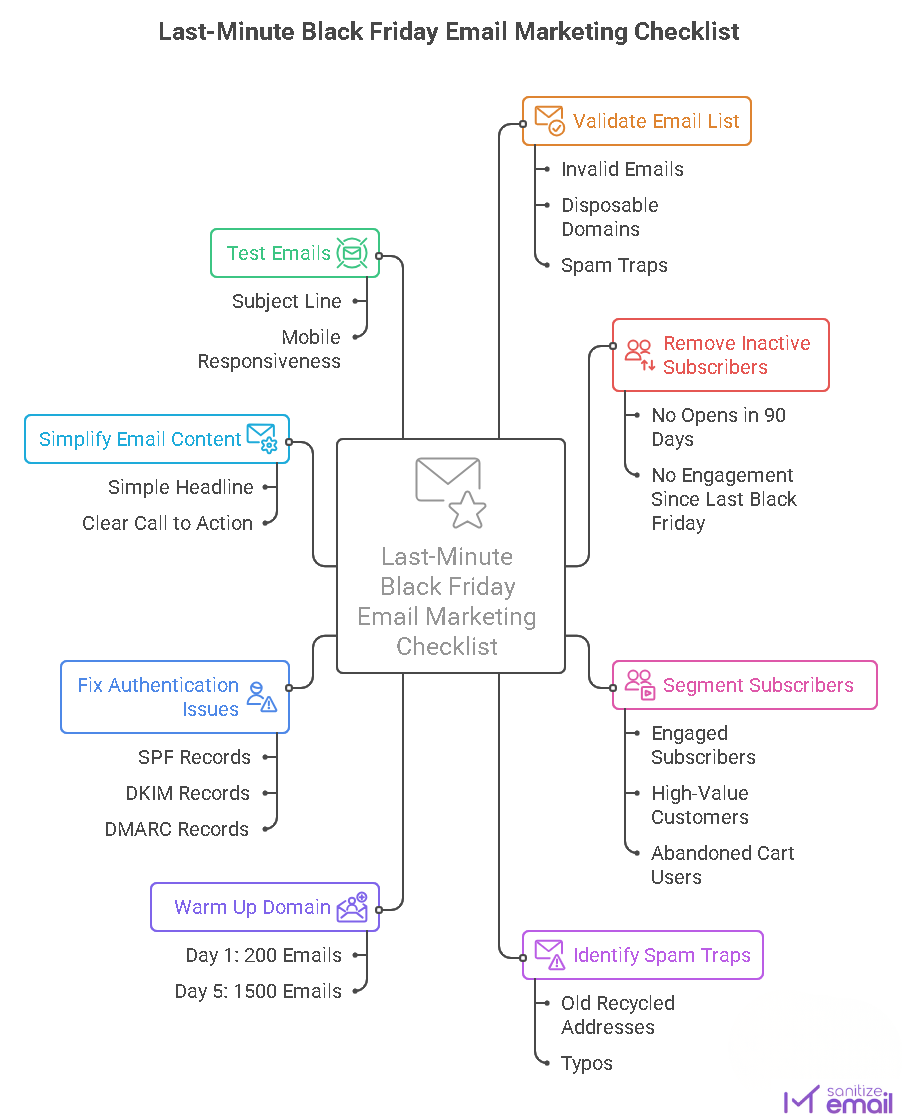
Your first step is to remove invalid, risky, and undeliverable emails. Even a few bad addresses can hurt your deliverability.
Use a reliable email verification tool like SanitizeEmail to check your entire list for:
Before you hit send, make sure your list is clean. Validate your email list with SanitizeEmail to avoid bounces and protect deliverability.
SanitizeEmail can validate your list in minutes, even if it contains thousands of emails. Once validated, export your clean list and replace your old one in your email marketing platform.
Even if an email address is valid, it might still lower your performance if the subscriber has not opened an email in months.
Remove or segment users who:
Why this matters: sending to inactive users hurts engagement, which signals to inbox providers that your content is unwanted.
Segmentation improves open and click rates, which boosts deliverability.
Quick segments you can create before Black Friday:
Send your strongest offer to your highest-engagement group. These users help build positive engagement signals early in the campaign.
Spam traps can cause major damage to your sender reputation. These include:
SanitizeEmail and other leading email verification tools identify these risky addresses automatically so you can remove them before campaign day.
If you use a new domain or have not sent emails in a long time, you should send warm-up emails before Black Friday. This increases trust with inbox providers.
A simple warm up schedule: Day 1: 200 emails Day 2: 300 emails Day 3: 500 emails Day 4: 800 emails Day 5: 1500 emails
Send these to your highest engaged subscribers.
Authentication issues cause many holiday emails to land in spam.
Check that your records are:
This step alone improves inbox placement significantly.
During high-volume events like Black Friday, even small authentication or sending issues can cause legitimate emails to be filtered as spam. Spam filters look at sender reputation, engagement history, and technical signals together — not in isolation. If you want a deeper understanding of how spam filters work and why emails fail to reach inboxes during peak campaigns, read our complete guide on why emails go to spam and how to stop it.
During Black Friday, subscribers skim more and read less. Your email should include:
Less clutter improves deliverability and engagement.
Run a final test using your email platform to check:
Testing prevents mistakes and protects deliverability.
Your first Black Friday email creates your initial engagement signal. If engagement is high, your next email is more likely to reach inboxes.
Start with:
Then send to the broader segments gradually.
If you expect sign ups during Black Friday or Cyber Monday, enable real-time email validation on your forms. This prevents invalid and spammy emails from entering your list during peak activity.
SanitizeEmail offers API based real-time validation for instant verification.
If you want faster improvements, do these three things today:
Inbox providers prefer simple, clear subjects.
Use fewer images and more text for better inbox placement.
Spread your campaigns throughout the day to avoid spam-like patterns.
These add up quickly and can boost your results even without long-term preparation.
Even if you are late preparing for Black Friday and Cyber Monday, you still have time to clean your list, improve deliverability, and set up a strong holiday campaign. By validating your list, removing risky emails, segmenting engaged users, and fixing authentication issues, you can still maximize your Black Friday email marketing results.
With a few fast improvements and the right tools, your emails can reach the right inboxes during the busiest season of the year.
.